
Download Metadatics – Advanced Audio Metadata Editor for Windows, macOS, iOS & Android
Overview
Metadatics is an advanced, robust audio metadata editor that puts you in full control of every tag in your music collection. Whether you own a handful of MP3 singles or a sprawling library of lossless FLAC and AIFF files, Metadatics provides a clean, intuitive interface combined with powerful batch‑processing capabilities. The app supports the most common audio formats—including MP3, AIFF, M4A, APE, FLAC, WMA, and OGG—so you never have to switch tools when a new file type appears.
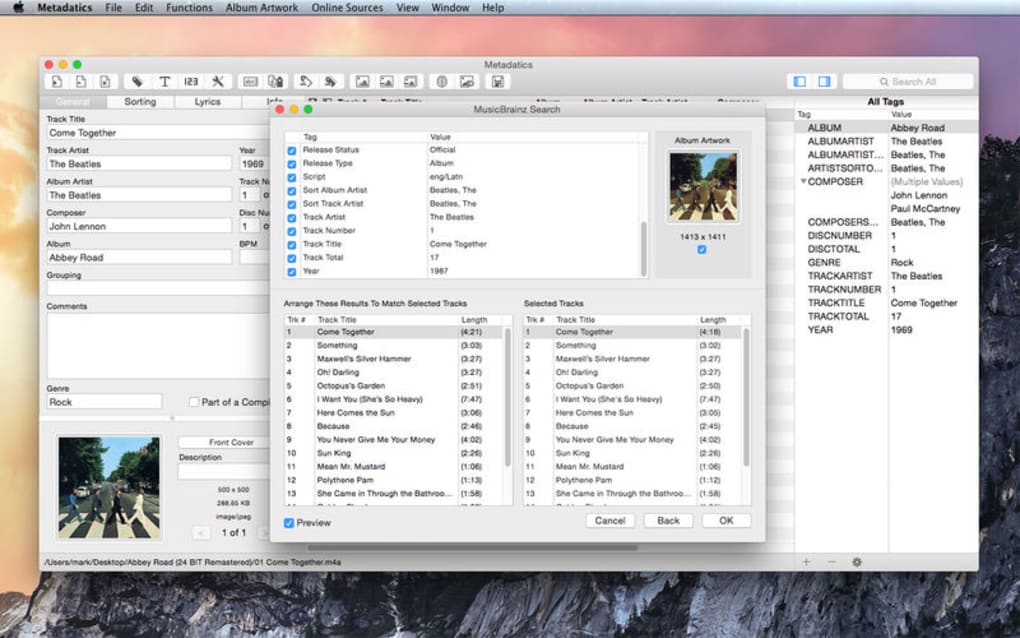
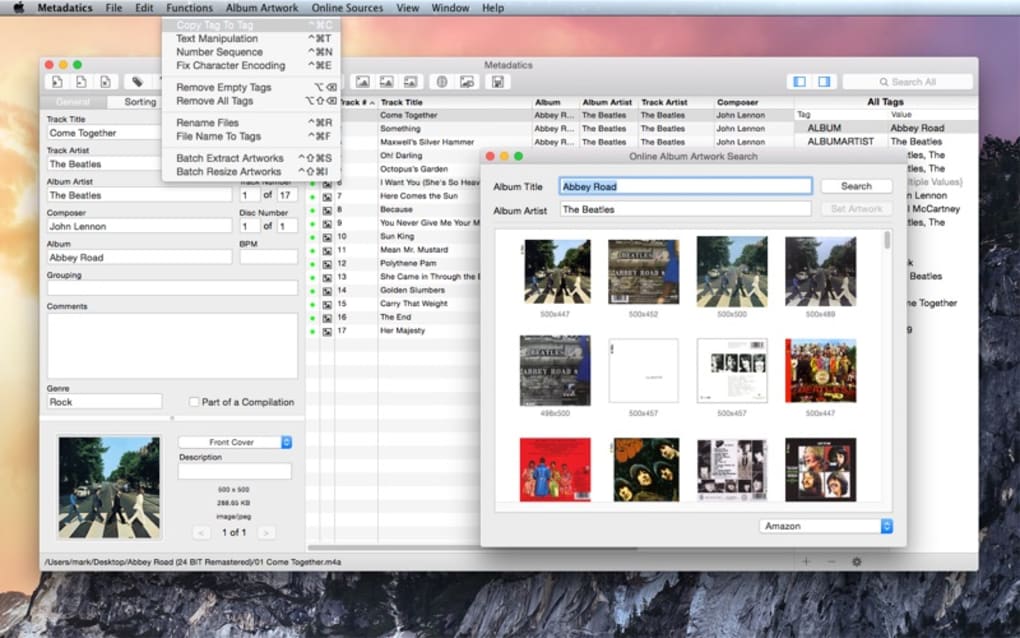
One of the standout features is the built‑in online lookup engine, which automatically pulls accurate information from sources such as MusicBrainz, Discogs, and Amazon, allowing you to fill in missing album art, release dates, genre tags, and more with a single click. In addition to simple tag editing, Metadatics offers sophisticated functions like text replacement, prefix/suffix trimming, numeric sequencing, and cross‑tag copying, making it possible to rename files based on metadata, generate consistent naming conventions, or correct systematic errors across hundreds of tracks in seconds. The batch editor works on both Windows and macOS, while companion mobile apps for iOS and Android let you tidy up your library on the go.
Security is baked in: all changes are saved locally, and the software never sends your personal music files to external servers. Whether you are a DJ curating playlists, a podcaster polishing episode files, or an audiophile who simply wants a tidy library, Metadatics offers a complete, free‑downloadable solution that feels both professional and approachable.
Key Features
- Multi‑Format Support: Edit MP3, AIFF, M4A, APE, FLAC, WMA, OGG and more without conversion.
- Online Metadata Lookup: Pull accurate tag data from MusicBrainz, Discogs, Amazon, and other databases.
- Batch Editing Engine: Apply changes to dozens or thousands of files in a single operation.
- Advanced Text Manipulation: Replace text, trim characters from the beginning or end of tags, and generate custom sequences.
- Cross‑Tag Copying: Copy values between tags (e.g., Artist → Album Artist) to maintain consistency.
- File Renaming Templates: Rename files automatically based on tag patterns such as “{TrackNumber} – {Title}”.
- Custom Scripts & Macros: Save frequently used actions as reusable macros.
- Integrated Album Art Manager: Embed, replace, or remove cover images directly within the editor.
- Secure Local Processing: All edits are performed on your device; no data is uploaded to the cloud.
- Cross‑Platform Availability: Native applications for Windows, macOS, iOS, and Android.
Installation & Usage Instructions
Getting started with Metadatics is straightforward, whether you are on a desktop or a mobile device. Follow the steps below to download, install, and begin editing your audio files:
Desktop (Windows/macOS)
- Visit the official Metadatics website and click the “Download for Windows” or “Download for macOS” button.
- The installer (EXE for Windows, DMG for macOS) will be saved to your default downloads folder.
- Run the installer and follow the on‑screen prompts—accept the license agreement, choose an installation directory, and click “Install”.
- After installation, launch Metadatics from the Start Menu (Windows) or Applications folder (macOS).
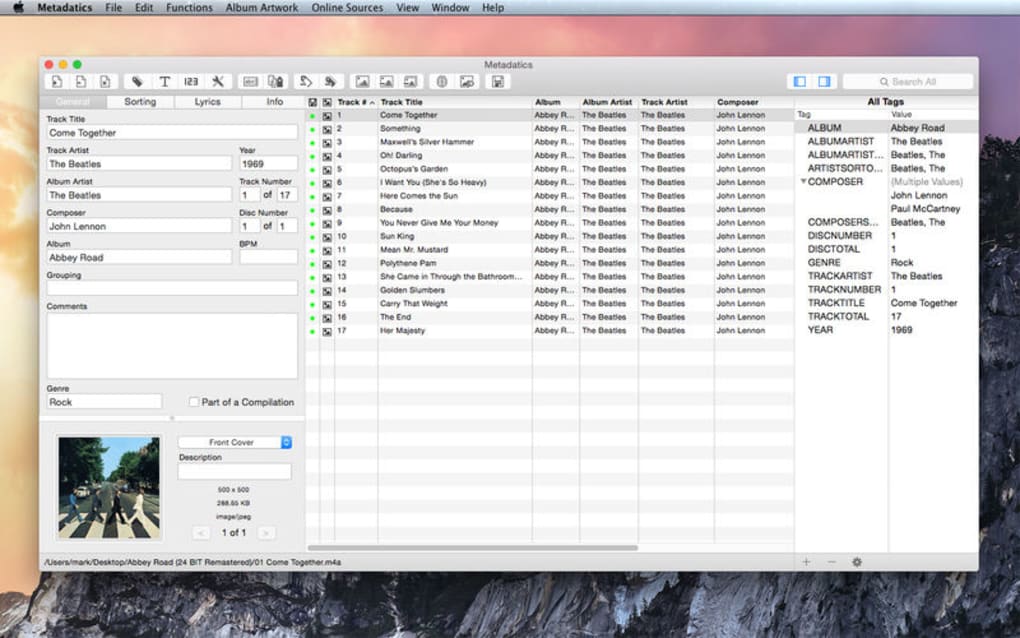
- When the app opens, you’ll see a clean library view. Drag and drop audio files or entire folders onto the main window, or use the “Add Files” button to browse your collection.
- Select a track to view its tags. Use the side panel to edit fields such as Title, Artist, Album, Year, Genre, and Custom Tags.
- To perform batch edits, hold Shift or Ctrl (Windows) / Command (macOS) and select multiple rows, then click the “Batch Edit” toolbar icon. Choose the desired operation (e.g., “Replace Text”, “Add Number Sequence”) and apply.
- When you’re satisfied, click “Save” or use the auto‑save option in Preferences. Changes are written directly to the files, preserving your original folder structure.
Mobile (iOS/Android)
- Open the App Store (iOS) or Google Play Store (Android) and search for “Metadatics”.
- Tap “Install” and wait for the app to download.
- Launch the app and grant permission to access your device’s music library.
- Navigate to the “Library” tab, select a track, and swipe left to reveal editing options.
- Use the built‑in lookup feature to fetch missing metadata, or manually edit tags using the on‑screen keyboard.
- For batch operations, tap the “Select” button, choose multiple files, and apply the desired transformation from the bottom action bar.
- Changes are saved instantly; you can also export a backup JSON file from Settings if you want to revert later.
Metadatics also includes a robust Help Center accessible from the “?” icon, where you can find video tutorials, troubleshooting tips, and a community forum for advanced scripting advice.
Compatibility & System Requirements
Metadatics is designed to run smoothly on the latest versions of the major operating systems while maintaining backward compatibility with recent legacy releases. Below are the minimum and recommended specifications for each platform:
Windows
- Supported versions: Windows 10 (1809+) and Windows 11.
- Processor: Intel Core i3 (2.5 GHz) or equivalent.
- Memory: Minimum 2 GB RAM (4 GB recommended).
- Disk space: 150 MB for installation plus additional space for temporary cache.
- Graphics: Integrated GPU with DirectX 11 support.
macOS
- Supported versions: macOS 10.15 Catalina, 11 Big Sur, 12 Monterey, and 13 Ventura.
- Processor: Apple M1/M2 or Intel Core i5 (2.0 GHz) or higher.
- Memory: Minimum 2 GB RAM (4 GB recommended).
- Disk space: 150 MB for the app, plus extra space for batch processing.
- Graphics: Built‑in Intel or Apple Silicon graphics.
iOS & Android
- iOS: 13.0 or later, iPhone 6S or newer, iPad Air 2 or newer.
- Android: 8.0 Oreo or later, 2 GB RAM, 100 MB free storage.
Because Metadatics performs all metadata operations locally, there are no special network requirements beyond optional online lookups. The app also integrates with popular media players such as iTunes, MusicBee, and VLC, ensuring that changes are reflected instantly across your ecosystem.
Pros, Cons & Frequently Asked Questions
Pros
- Extensive format support eliminates the need for conversion tools.
- Powerful batch editor saves hours on large libraries.
- Integrated online lookup provides accurate, up‑to‑date metadata.
- Cross‑platform availability means you can edit on desktop or mobile.
- Secure, local processing respects user privacy.
Cons
- Learning curve for advanced batch functions can be steep for beginners.
- Full feature set is unlocked only in the paid version ($39.99).
- No built‑in audio player preview; you need an external player for real‑time listening.
- Mobile UI, while functional, is less polished than the desktop counterpart.
- Occasional latency when querying large online databases on slower connections.
FAQ
Can Metadatics edit DRM‑protected files?
No. Metadatics works only with non‑protected audio files. DRM‑protected tracks must be converted to a supported format before editing.
Is there a free trial available?
Yes. A 14‑day free trial gives you access to all premium features, after which you can purchase the full license for $39.99.
How does the online lookup handle regional releases?
Metadatics queries multiple databases and selects the most relevant match based on album title, artist, and release year. It supports regional variations, but you can manually choose an alternative entry if the default is inaccurate.
Can I undo changes if I make a mistake?
Yes. Metadatics includes an “Undo” function for the current session and allows you to export a backup JSON file before making bulk edits, enabling a full rollback if needed.
Does Metadatics support custom tag fields?
Absolutely. Users can create, edit, and map custom tag fields, making it suitable for niche metadata standards used by collectors and archivists.
Conclusion & Call to Action
Metadatics stands out as a comprehensive, secure, and cross‑platform solution for anyone who takes their music library seriously. Its blend of user‑friendly design and deep batch‑processing capabilities bridges the gap between casual users who simply want to correct a few misspelled titles and power users who need to overhaul thousands of files in a single operation. While the premium price may deter occasional users, the free trial provides ample opportunity to assess whether the feature set justifies the investment. In an era where streaming services dominate, maintaining a well‑organized personal collection still matters for audiophiles, DJs, and content creators. Metadatics delivers the tools needed to keep that collection tidy, searchable, and ready for any playback environment.
Ready to give your audio files the professional treatment they deserve? Download Metadatics now and start cleaning up your metadata with confidence. Whether you’re on Windows, macOS, iOS, or Android, the app’s secure, offline processing ensures your music stays private while you enjoy a perfectly organized library.







